CAT Control
AetherSDR has a built-in CAT server, so logging and digital-mode programs can read and set frequency, mode, split and PTT without an external rigctld or a SmartSDR CAT install. It offers up to eight CAT ports. Each port speaks one of three dialects: Hamlib Rigctld (NET rigctl), Kenwood TS-2000, or Flex (FlexCAT, the SmartSDR CAT command set). On Linux and macOS every port can also appear as a virtual serial port.
CAT works with WSJT-X, JTDX, fldigi, JS8Call, Winlink/VARA, N1MM+, DXLog and most other Hamlib- or Kenwood-aware programs. For audio, pair it with DAX Virtual Audio, or use the TCI Server, which carries CAT and audio over one connection.
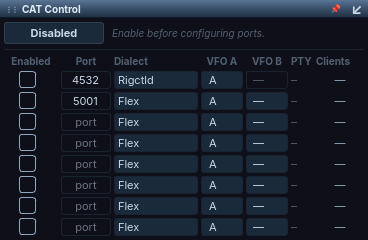
The CAT Control applet popped out of the applet panel, showing the full channel table.
Setup
The CAT applet
CAT has its own CAT Control applet (applet-tray button CAT, Integration category). Docked, it shows only the master Enabled / Disabled button. To configure ports, pop the applet out with the float button on its title bar. The floating view reads "Enable before configuring ports" and lists one row per port:
| Column | Meaning |
|---|---|
| Enabled | Starts this port. A port runs only when the master switch is on, this box is ticked and a port number is set. |
| Port | TCP port, 1024–65535. |
| Dialect | Rigctld, TS-2000 or Flex. |
| VFO A | The slice this port controls as VFO A. |
| VFO B | The slice used as VFO B (dual-VFO dialects only; see Choosing a dialect). |
| PTY | The virtual serial port path (Linux and macOS only). Right-click → Copy PTY Name. |
| Clients | Number of programs connected to the port, or "—" when it is stopped. |
While a port is running, its port number, dialect and VFO selectors are locked. Untick the port to change them.
The VFO selectors list one letter per receiver the connected radio offers, up to A–H. If you connect to a smaller radio, a slice choice it cannot show is kept and comes back when that slice exists again.
Turning CAT on
- Settings → Autostart CAT with AetherSDR is the same switch as the applet's master Enabled button. While it is on, every enabled port starts when you connect to a radio.
- A fresh install has CAT switched off, with two rows pre-filled: port 4532 as Rigctld on slice A, and port 5001 as Flex with VFO A = slice A and VFO B = slice B. Both rows are unticked. The other six rows are empty.
Upgrading from an older version: there is no longer a DIGI applet or a fixed set of four servers on ports 4532–4535. The first time the CAT applet ran, your old rigctld and SmartCAT settings were moved to its first two rows.
Using CAT Control
Choosing a dialect
| Dialect | Use it for | VFO B |
|---|---|---|
| Rigctld | Hamlib "NET rigctl" clients: WSJT-X, JTDX, fldigi, JS8Call, VARA/Winlink | Not used. Split is created on demand when the program asks for it. |
| TS-2000 | Programs that only offer a Kenwood rig | Yes |
| Flex | Programs with a SmartSDR CAT / FlexRadio profile (Kenwood commands plus the ZZ extensions) | Yes |
Switching a port between a single-VFO and a dual-VFO dialect keeps your VFO B choice; it reappears when you switch back.
The rigctld dialect follows the Hamlib NET rigctl command set: frequency, mode and passband, VFO, split, PTT, levels, functions, CTCSS/FM tones, dump_state and the long \ forms. See the Hamlib documentation for the commands themselves.
Testing a rigctld port
echo "f" | nc localhost 4532
# 14074000

echo "F 7074000" | nc localhost 4532
# RPRT 0
Virtual serial ports (Linux and macOS)
Each CAT port also creates a pseudo-terminal, so programs that only offer a serial port can connect. The path is shown in the applet's PTY column:
| Platform | Path |
|---|---|
| Linux | $XDG_RUNTIME_DIR/aethersdr/cat-A … cat-H (falls back to the user cache directory when there is no runtime directory) |
| macOS | ~/Library/Caches/AetherSDR/cat-A … cat-H |
| Windows | No virtual serial ports. Use the TCP ports. |
The letter is the port's row (first row = cat-A), not the slice. The path is a per-user symlink to the current pseudo-terminal and is replaced atomically, so a program can keep the same path across restarts.
Upgrading from an older version: the serial ports used to be
/tmp/AetherSDR-CAT-A…D. They moved to the per-user paths above for security (GHSA-qxhr-cwrc-pvrm). Re-point fldigi and any other serial-port program at the new path.
Reference
Command behaviour
- Band changes move the panadapter. A tune that lands inside the visible span moves only the slice, so Doppler-stepping satellite software does not keep re-centring the pan. A tune outside the span, or to another band, re-centres or re-bands the panadapter. This applies to WSJT-X and fldigi band changes, rigctld
set_freq,FA/FBand VFO up/down (#4876). - Locked slices refuse. A CAT tune on a locked slice returns an error instead of a false success.
- Split is tracked per client. Each CAT client sees its own split state, so several WSJT-X instances (one per port) can all use Split Operation: Fake It (#4853).
- Safety. A bare
ZZTX;reads the transmit state; it does not key. TS-2000 satellite-mode TX is refused. Repeatingset_split_vfoortx_enablewith the same value does not trip the radio's TX watchdog. - S-meter. rigctld
l STRENGTHreads the real S-meter of the addressed slice, in dB relative to S9. - Tuning step.
set_ts 0answersRPRT -1on every radio. On radios other than FlexRadio,set_tssets AetherSDR's own tuning step. - RF gain on other radios. On the Hermes-Lite 2 and other non-Flex radios,
L RF/l RFscale across the radio's published RF-gain range (on the HL2, 0.5 = +18 dB). Until a range is published the command answersRPRT -11(#6013). - CW over rigctld.
cwx sendand the clear commands go through the CWX model, so sidetone matches manual keying.
Known issues
- A cross-band tune from a CAT or TCI program moves the frequency but does not recall the radio's band stack, so the per-band antenna, mode and filters are not restored. On a transverter band this can leave the wrong antenna port selected (#3543).
- CAT ports listen on every network interface with no password, so any machine that can reach a port can tune and key the radio (#5296).
- MacLoggerDX on macOS can be slow to connect and can drop its connection (#5699).
Troubleshooting
To capture a log for any CAT problem, turn on the TCI / CAT / rigctld category in Help → Support & Diagnostics…. It logs the CAT servers and the virtual serial ports. See Support and Logging.
The Clients column shows "—"
The port is not running.
- Check that the master Enabled switch is on (or Settings → Autostart CAT with AetherSDR is ticked).
- Tick the port's Enabled box.
- Make sure the row has a port number set.
You can't change a port's number, dialect or VFO
The port is running, and a running port's settings are locked.
- Untick the port's Enabled box.
- Change the setting.
- Tick Enabled again.
The program tunes the wrong slice
The port's VFO A points at a different slice.
- Pop out the CAT applet.
- Untick the port, set its VFO A letter to the slice you want, and tick it again.
A serial-port program can't open /tmp/AetherSDR-CAT-A
The virtual serial ports moved to per-user paths.
- Read the new path from the port's PTY column (right-click → Copy PTY Name).
- Point the program (fldigi, for example) at that path.